GPS Vehicle Tracking Systems
      GPS Vehicle Tracking Systems
GPS Fleet Tracking Systems
spacer
Home GPS Tracking Units GPS Resources Contact Us.
Shadow Tracker

 GPS Tracking Units

 GPS Tracking Software

 GPS Tracking Maps

 Vehicle Tracking Reports


Call 800-665-7203

Call 800-665-7203 Now

GPS Vehicle Tracking Maps and Reports


Pro Maps


Enlarge Picture
The Pro Software allows users to zoom into the action. This screen shot demonstrates the broad scope a user can derive from the software. For demonstration purposes only one vehicle is used, as more vehicles are added to the users fleet, more vehicle would show up on the screen.


Enlarge Picture

The zoom process is as simple as right clicking and dragging the dashed cursor around the area to be enlarged. Here we have an example of a zoom in progress, we are at a citywide view and are planning to drop down to a street level view. Notice the speed bar and the color coded route.


Enlarge Picture

At street level we can clearly see stops marked by a red stop sign. Right clicking on these stops pops up a summary of the stop: stop number, time, and duration. This makes it a breeze to determine where and when your employees were at certain locations.


Enlarge Picture

The "Track Details" feature allows you to view all stops in text fashion while looking at the route on the map. You can also click on a specific stop number and the map will automatically jump to and center over that stop.


Enlarge Picture

Map images become more and more detailed as the zoom increases. Street names are listed as well as geographic markers (schools, airports, creeks, railways, parks, etc.). This makes it extremely easy to decipher the data and make decisions that will help your company.
Top


Lite Maps


Enlarge Picture
This view is extremely similar to the Pro software. While the Pro does offer features not available in the Lite, the mapping and tracking capabilities are as exact.


Enlarge Picture


Similar to the Pro, the Lite Mapping Software offers the ability to bring up street names and stop locations and times. The zoom capabilities and accuracy are the same as the Pro version of the software.
Top


Pro Reports


Enlarge Picture
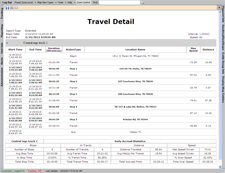
"Daily Travel Reports" itemize a vehicle's complete movement. It shows stop times, locations, and durations, as well as in-transit routes. This is perfect for the manager who wants to find out and record complete records for employees on a daily basis. An accrual of statistics is available at the end of the Daily Travel Report. These statistics analyze vehicle movements and allow managers to compare employee productivity company wide.


Enlarge Picture

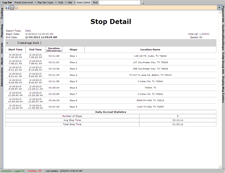
"Stop Reports" allow managers to isolate stop locations, times and durations for a particular date range. By limiting a report to just one data type, easy analysis can be made and the facts that matter to a manager can be analyzed.


Enlarge Picture

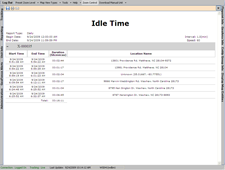
The "Idle Time Report" tells you how long the vehicle was left idling at each and every stop.


Enlarge Picture

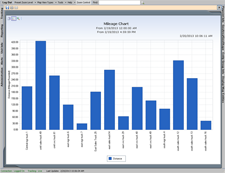
Our "Mileage by State Report" will break down the mileage traveled for each day in any state the vehicle traveled.


Enlarge Picture


This "Complete Tracking Report" demonstrates the ease at which one can view a full day of activities. Pinpoints made by fleet managers allow clear descriptions of exactly where employees go while on shift. Stop times are clearly marked and times on the job sites can be recorded for later use. Billing, mileage, break times, payroll, and speeds can all be verified using the Shadow Tracker™.
Top


Lite Reports


Enlarge Picture
"Daily Travel Reports" itemize a vehicle's complete movement. It shows stop times, locations, and durations, as well as in-transit routes. This is perfect for the manager who wants to find out and record complete records for employees on a daily basis. An accrual of statistics is available at the end of the Daily Travel Report. These statistics analyze vehicle movements and allow managers to compare employee productivity company wide.


Enlarge Picture

This "Complete Tracking Report" demonstrates the ease at which one can view a full day of activities. Pinpoints made by fleet managers allow clear descriptions of exactly where employees go while on shift. Stop times are clearly marked and times on the job sites can be recorded for later use. Billing, mileage, break times, payroll, and speed can all be verified using the Shadow Tracker™.
Top

Which Shadow Tracker™ Is Right For Me?

Each model in the Shadow Tracker™ product line offers many different features. Call us for more information and one of our friendly sales staff will help you find out!
Home  ·  GPS Tracking Products  ·  GPS Resources  ·  Contact Us
GPS Tracking Units  ·  GPS Tracking Software  ·  GPS Tracking Maps  ·  Vehicle Tracking Reports
gps
800-665-7203 (US & Canada)  •   sales@onetrackinc.com  •  2375 E. Camelback, Suite 500, Phoenix, AZ 85016, US
© 2006 One Track, Inc. - GPS Fleet Tracking Systems. All Rights Reserved


In today's economy, fuel costs, payroll cost and fleet maintenance cost are critical to the success of your company. Reducing these costs is a good way to increase profitability and to stay competitive.

One Track's GPS Vehicle Tracking System's designed to track mobile fleet's daily activities and against unauthorized use of vehicles. With no monthly fees, our GPS fleet tracking systems are one-time low cost investment. CALL US NOW AT 800-665-7203 FOR YOUR UNIQUE FLEET TRACKING PACKAGE.